
ArchiveBox
Open-source self-hosted web archiving.
▶️ Quickstart | Demo | GitHub | Documentation | Info & Motivation | Community






docker-compose (macOS/Linux/Windows) 👈 recommended (click to expand)docker-compose.yml file into a new empty directory (can be anywhere).
mkdir ~/archivebox && cd ~/archivebox
curl -O 'https://raw.githubusercontent.com/ArchiveBox/ArchiveBox/dev/docker-compose.yml'
docker compose run archivebox init --setup
docker compose up
# completely optional, CLI can always be used without running a server
# docker compose run [-T] archivebox [subcommand] [--args]
docker run (macOS/Linux/Windows)mkdir ~/archivebox && cd ~/archivebox
docker run -v $PWD:/data -it archivebox/archivebox init --setup
docker run -v $PWD:/data -p 8000:8000 archivebox/archivebox
# completely optional, CLI can always be used without running a server
# docker run -v $PWD:/data -it [subcommand] [--args]

bash auto-setup script (macOS/Linux)curl -sSL 'https://get.archivebox.io' | shsetup.sh for the source code of the auto-install script.
apt (Ubuntu/Debian)echo "deb http://ppa.launchpad.net/archivebox/archivebox/ubuntu focal main" | sudo tee /etc/apt/sources.list.d/archivebox.list
sudo apt-key adv --keyserver keyserver.ubuntu.com --recv-keys C258F79DCC02E369
sudo apt update
apt.
sudo apt install archivebox
sudo python3 -m pip install --upgrade --ignore-installed archivebox   # pip needed because apt only provides a broken older version of Django
mkdir ~/archivebox && cd ~/archivebox
archivebox init --setup           # if any problems, install with pip instead
archivebox server 0.0.0.0:8000
# completely optional, CLI can always be used without running a server
# archivebox [subcommand] [--args]
debian-archivebox repo for more details about this distribution.

brew (macOS)brew.
brew tap archivebox/archivebox
brew install archivebox
mkdir ~/archivebox && cd ~/archivebox
archivebox init --setup         # if any problems, install with pip instead
archivebox server 0.0.0.0:8000
# completely optional, CLI can always be used without running a server
# archivebox [subcommand] [--args]
homebrew-archivebox repo for more details about this distribution.

pip (macOS/Linux/BSD)pip3.
pip3 install archivebox
mkdir ~/archivebox && cd ~/archivebox
archivebox init --setup
# install any missing extras like wget/git/ripgrep/etc. manually as needed
archivebox server 0.0.0.0:8000
# completely optional, CLI can always be used without running a server
# archivebox [subcommand] [--args]
pip-archivebox repo for more details about this distribution.

pacman / 
pkg / 
nix (Arch/FreeBSD/NixOS/more)yay -S archivebox (contributed by @imlonghao)curl -sSL 'https://get.archivebox.io' | sh (uses pkg + pip3 under-the-hood)nix-env --install archivebox (contributed by @siraben) docker + 
electron Desktop App (macOS/Linux/Windows)ArchiveBox.app.zipArchiveBox.deb (alpha: build manually)ArchiveBox.exe (beta: build manually) Paid hosting solutions (cloud VPS)
 (get hosting, support, and feature customization directy from us)
 (for a generalist software consultancy that helps with ArchiveBox maintainance)
 (USD $29-250/mo, pricing)
 (from USD $2.6/mo)
 (USD $5-50+/mo, 🎗 referral link, instructions)
 (USD $2.5-50+/mo, 🎗 referral link, instructions)
 (USD $10-50+/mo, instructions)
 (USD $60-200+/mo)
 (USD $60-200+/mo)
https://demo.archivebox.io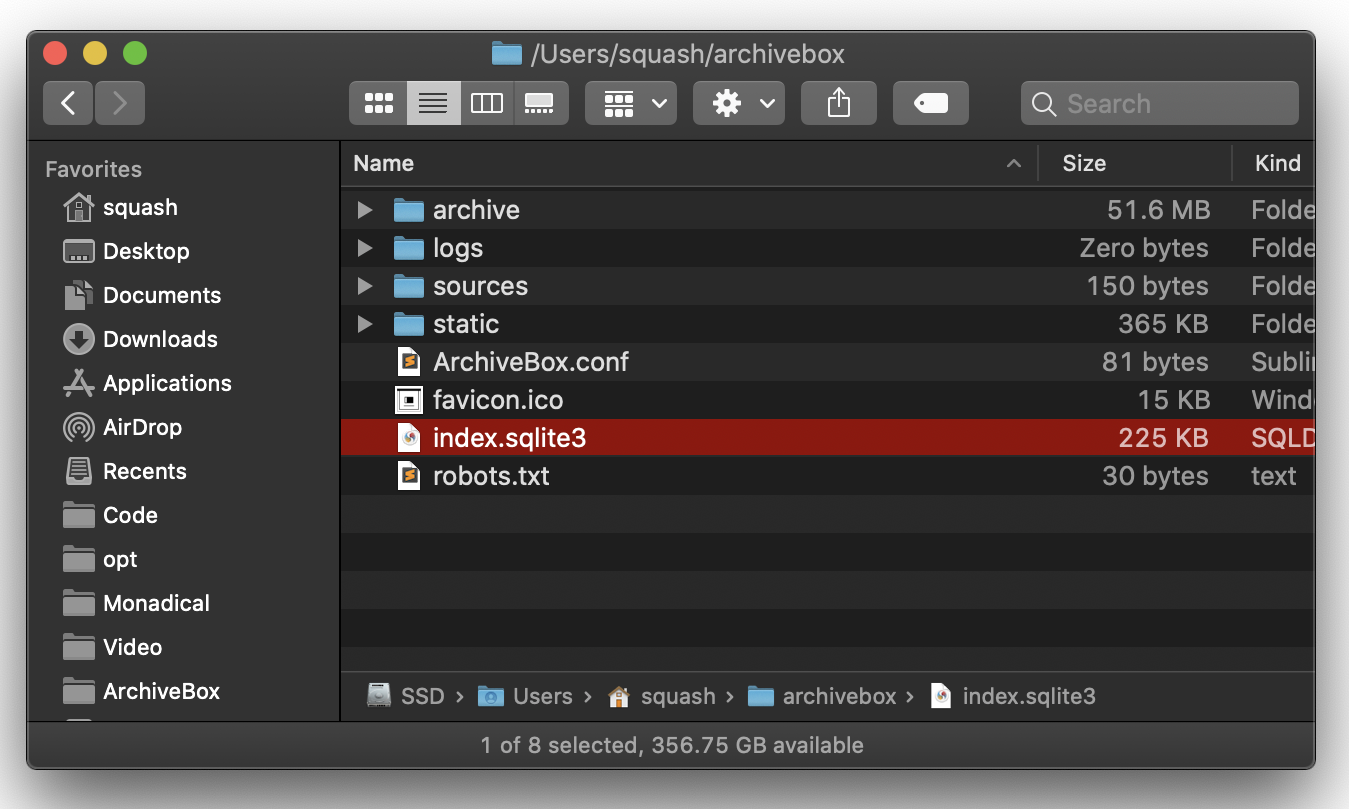 ```bash
/data/
index.sqlite3
ArchiveBox.conf
archive/
...
1617687755/
index.html
index.json
screenshot.png
media/some_video.mp4
warc/1617687755.warc.gz
git/somerepo.git
...
```
Each snapshot subfolder `./archive/
```bash
/data/
index.sqlite3
ArchiveBox.conf
archive/
...
1617687755/
index.html
index.json
screenshot.png
media/some_video.mp4
warc/1617687755.warc.gz
git/somerepo.git
...
```
Each snapshot subfolder `./archive/
 button in the Admin UI is a shortcut for this hash-date multi-snapshotting workaround.
Improved support for saving multiple snapshots of a single URL without this hash-date workaround will be [added eventually](https://github.com/ArchiveBox/ArchiveBox/issues/179) (along with the ability to view diffs of the changes between runs).
#### Learn More
- https://github.com/ArchiveBox/ArchiveBox/issues/179
- https://github.com/ArchiveBox/ArchiveBox/wiki/Usage#explanation-of-buttons-in-the-web-ui---admin-snapshots-list
button in the Admin UI is a shortcut for this hash-date multi-snapshotting workaround.
Improved support for saving multiple snapshots of a single URL without this hash-date workaround will be [added eventually](https://github.com/ArchiveBox/ArchiveBox/issues/179) (along with the ability to view diffs of the changes between runs).
#### Learn More
- https://github.com/ArchiveBox/ArchiveBox/issues/179
- https://github.com/ArchiveBox/ArchiveBox/wiki/Usage#explanation-of-buttons-in-the-web-ui---admin-snapshots-list
|
|
|
|
|
|
|
|
|
|
 We use the [GitHub wiki system](https://github.com/ArchiveBox/ArchiveBox/wiki) and [Read the Docs](https://archivebox.readthedocs.io/en/latest/) (WIP) for documentation.
You can also access the docs locally by looking in the [`ArchiveBox/docs/`](https://github.com/ArchiveBox/ArchiveBox/wiki/Home) folder.
## Getting Started
- [Quickstart](https://github.com/ArchiveBox/ArchiveBox/wiki/Quickstart)
- [Install](https://github.com/ArchiveBox/ArchiveBox/wiki/Install)
- [Docker](https://github.com/ArchiveBox/ArchiveBox/wiki/Docker)
- [Usage](https://github.com/ArchiveBox/ArchiveBox/wiki/Usage)
- [Configuration](https://github.com/ArchiveBox/ArchiveBox/wiki/Configuration)
- [Supported Sources](https://github.com/ArchiveBox/ArchiveBox/wiki/Quickstart#2-get-your-list-of-urls-to-archive)
- [Supported Outputs](https://github.com/ArchiveBox/ArchiveBox/wiki#can-save-these-things-for-each-site)
## Advanced
- [Troubleshooting](https://github.com/ArchiveBox/ArchiveBox/wiki/Troubleshooting)
- [Scheduled Archiving](https://github.com/ArchiveBox/ArchiveBox/wiki/Scheduled-Archiving)
- [Publishing Your Archive](https://github.com/ArchiveBox/ArchiveBox/wiki/Publishing-Your-Archive)
- [Chromium Install](https://github.com/ArchiveBox/ArchiveBox/wiki/Chromium-Install)
- [Cookies & Sessions Setup](https://github.com/ArchiveBox/ArchiveBox/wiki/Chromium-Install#setting-up-a-chromium-user-profile)
- [Security Overview](https://github.com/ArchiveBox/ArchiveBox/wiki/Security-Overview)
- [Upgrading or Merging Archives](https://github.com/ArchiveBox/ArchiveBox/wiki/Upgrading-or-Merging-Archives)
## Developers
- [Developer Documentation](https://github.com/ArchiveBox/ArchiveBox#archivebox-development)
- [Python API](https://docs.archivebox.io/en/latest/modules.html) (alpha)
- [REST API](https://github.com/ArchiveBox/ArchiveBox/issues/496) (alpha)
## More Info
- [Bug Tracker](https://github.com/ArchiveBox/ArchiveBox/issues)
- [Roadmap](https://github.com/ArchiveBox/ArchiveBox/wiki/Roadmap)
- [Changelog](https://github.com/ArchiveBox/ArchiveBox/releases)
- [Donations](https://github.com/ArchiveBox/ArchiveBox/wiki/Donations)
- [Background & Motivation](https://github.com/ArchiveBox/ArchiveBox#background--motivation)
- [Web Archiving Community](https://github.com/ArchiveBox/ArchiveBox/wiki/Web-Archiving-Community)
We use the [GitHub wiki system](https://github.com/ArchiveBox/ArchiveBox/wiki) and [Read the Docs](https://archivebox.readthedocs.io/en/latest/) (WIP) for documentation.
You can also access the docs locally by looking in the [`ArchiveBox/docs/`](https://github.com/ArchiveBox/ArchiveBox/wiki/Home) folder.
## Getting Started
- [Quickstart](https://github.com/ArchiveBox/ArchiveBox/wiki/Quickstart)
- [Install](https://github.com/ArchiveBox/ArchiveBox/wiki/Install)
- [Docker](https://github.com/ArchiveBox/ArchiveBox/wiki/Docker)
- [Usage](https://github.com/ArchiveBox/ArchiveBox/wiki/Usage)
- [Configuration](https://github.com/ArchiveBox/ArchiveBox/wiki/Configuration)
- [Supported Sources](https://github.com/ArchiveBox/ArchiveBox/wiki/Quickstart#2-get-your-list-of-urls-to-archive)
- [Supported Outputs](https://github.com/ArchiveBox/ArchiveBox/wiki#can-save-these-things-for-each-site)
## Advanced
- [Troubleshooting](https://github.com/ArchiveBox/ArchiveBox/wiki/Troubleshooting)
- [Scheduled Archiving](https://github.com/ArchiveBox/ArchiveBox/wiki/Scheduled-Archiving)
- [Publishing Your Archive](https://github.com/ArchiveBox/ArchiveBox/wiki/Publishing-Your-Archive)
- [Chromium Install](https://github.com/ArchiveBox/ArchiveBox/wiki/Chromium-Install)
- [Cookies & Sessions Setup](https://github.com/ArchiveBox/ArchiveBox/wiki/Chromium-Install#setting-up-a-chromium-user-profile)
- [Security Overview](https://github.com/ArchiveBox/ArchiveBox/wiki/Security-Overview)
- [Upgrading or Merging Archives](https://github.com/ArchiveBox/ArchiveBox/wiki/Upgrading-or-Merging-Archives)
## Developers
- [Developer Documentation](https://github.com/ArchiveBox/ArchiveBox#archivebox-development)
- [Python API](https://docs.archivebox.io/en/latest/modules.html) (alpha)
- [REST API](https://github.com/ArchiveBox/ArchiveBox/issues/496) (alpha)
## More Info
- [Bug Tracker](https://github.com/ArchiveBox/ArchiveBox/issues)
- [Roadmap](https://github.com/ArchiveBox/ArchiveBox/wiki/Roadmap)
- [Changelog](https://github.com/ArchiveBox/ArchiveBox/releases)
- [Donations](https://github.com/ArchiveBox/ArchiveBox/wiki/Donations)
- [Background & Motivation](https://github.com/ArchiveBox/ArchiveBox#background--motivation)
- [Web Archiving Community](https://github.com/ArchiveBox/ArchiveBox/wiki/Web-Archiving-Community)